Blogger-droid (Ad-free)
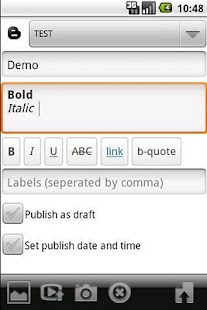
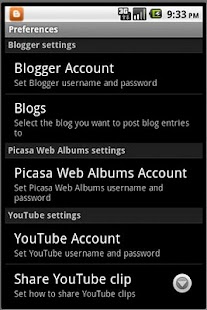
You can:-create/view/edit/delete blog posts-post comments to published blog posts-upload picture(s) and video(s)-select size and quality of pictures uploaded-select upload album at Picasa Web Albums-set publish date/time-publish as draft-share pictures, videos, YouTube clips, links etc.
* No ads* No Blogger-droid signature* Using Flurry for basic metrics
Client for blogger.com (blogspot.com).
*** Follow Blogger-droid on Twitter - @bloggerdroid ***
---Do you need support, have any questions or a feature request, send a mail to: [email protected] or use GTalk: [email protected]
---FAQ---Q: I keep getting a CAPTCHA error?
A: The CAPTCHA handling in the app is a known bug, to get rid of the CAPTCHA requirement you need to use a browserand log in at http://www.blogger.com and/or http://picasaweb.google.com and/or http://www.youtube.com (depending on which google service requiring CAPTCHA)with the same credentials that you're using in Blogger-droid app.
Q: I get a 403 or 404 error when trying to publish blog posts with pictures?
A 1: To be able to post pictures, you must activate your account @ http://picasaweb.google.com, all pictures uploaded from Blogger-droid will end up in the default album 'Drop box'.A 2: Your Google account may be full.A 3: Your 'Drop box' album may be full.
It seems like there is a limit of 1000 pictures in a album.A 4: Make sure there is no unwanted spaces in your username, some keyboard software have a tendency to add a space at the end.
Q: I can't publish blog posts with pictures?
A: To be able to post pictures, you must activate your account @ http://picasaweb.google.com.
About Blogger-droid (Ad-free)
- Package name (App ID)
- and.blogger.paid
- Available on
- Google Play
- Price
- Free
- Version
- v1.1.13
- Developer
- KBeanie Apps
Looking for the Blogger-droid (Ad-free) APK?
The safest way to get Blogger-droid (Ad-free) (and.blogger.paid) on your Android device is to install it directly from Google Play — you'll always get the latest official version, automatic updates, and no risk of modified or infected APK files from third-party sites.
Social Features
Connect and share with friends and the community.
Camera Features
Advanced camera features with editing capabilities.
Food & Dining
Discover recipes and order food from your favorite restaurants.
See Blogger-droid (Ad-free) in Action

Frequently Asked Questions
Is Blogger-droid (Ad-free) free?
Yes, Blogger-droid (Ad-free) is free to download and install on Android through Google Play.
How do I install Blogger-droid (Ad-free) on Android?
Open Google Play on your Android phone or tablet, search for Blogger-droid (Ad-free) by KBeanie Apps or tap the Google Play button on this page, then tap Install. The app downloads and installs automatically.
What is and.blogger.paid?
and.blogger.paid is the App ID (package name) of Blogger-droid (Ad-free) on Google Play. Every Android app has a unique package name, and it is the safest way to verify you are installing the official app.
Is Blogger-droid (Ad-free) safe to download?
Installing Blogger-droid (Ad-free) from Google Play is the safest option: you get the official version published by KBeanie Apps, verified by Google Play Protect, with automatic updates. Avoid APK files from unofficial third-party sites.
Get Blogger-droid (Ad-free) Today
Blogger-droid (Ad-free) for Android — free download on Google Play.
Compatible with Android phones and tablets — available on Google Play.
Ask AI about this app
Get instant answers about features, tips and more from popular AI assistants.